Reversing BEDaisy.sys: Static Analysis of BattlEye's Kernel Anti-Cheat Driver
In the first post I covered how kernel anti-cheat systems work at an architectural level: the callbacks they register, the memory scanning they perform, the detection techniques they use. All of that was theoretical, with small proof-of-concept drivers and WinDbg demos to illustrate each concept. This post is the practical follow-up. I wanted to take one real, production anti-cheat driver and see how much of its internals I could recover through static and dynamic analysis.
The target is BEDaisy.sys, BattlEye’s kernel driver. BattlEye is used by PUBG, Rainbow Six Siege, DayZ, Escape from Tarkov, and dozens of other titles. The driver is heavily protected with custom code obfuscation, debugger detection, and minifilter-based filesystem monitoring. Previous public analysis exists from secret.club, back.engineering, and Aki2k’s GitHub repository, but those were written against older versions and I wanted to work through the process myself against the current build.
This is not a complete reverse engineering of BEDaisy. The driver is over 7MB of obfuscated code and a full analysis would take weeks or months. What this post covers is the methodology I used to extract and analyze the driver, the protections I encountered, and the specific findings I was able to recover. If something is wrong or incomplete, that is expected given the scope, and I welcome corrections.
1. Obtaining and Triaging BEDaisy.sys
Where BEDaisy Lives
BEDaisy.sys is not distributed as a standalone download. It is deployed alongside games that use BattlEye, typically in a shared directory:
1
2
3
4
C:\Program Files (x86)\Common Files\BattlEye\
├── BEDaisy.sys          (7,897,368 bytes)
├── BEService.exe
└── BEService_dayz.exe
The driver is loaded on demand by BEService.exe when a protected game launches. It registers as a minifilter driver through Filter Manager and unloads when the game exits. Unlike Vanguard’s vgk.sys, which loads at boot, BEDaisy only exists in memory while a BattlEye-protected game is running.
Section Layout
Opening the on-disk binary in IDA or Binary Ninja immediately reveals something unusual about the PE structure. BEDaisy has a tiny .text section and a massive custom section called .be0:
| Section | Virtual Address | Virtual Size | Characteristics |
|---|---|---|---|
.text | 0x1000 | 0x19A00 | Code, Execute, Read |
.be0 | 0x20000 | 0x768000 | Code, Execute, Read |
The .text section is roughly 100KB. The .be0 section is 7.4MB, accounting for the vast majority of the binary. This is not a standard section name, and the ratio is immediately suspicious. A legitimate driver with 100KB of code does not need a 7.4MB additional code section.
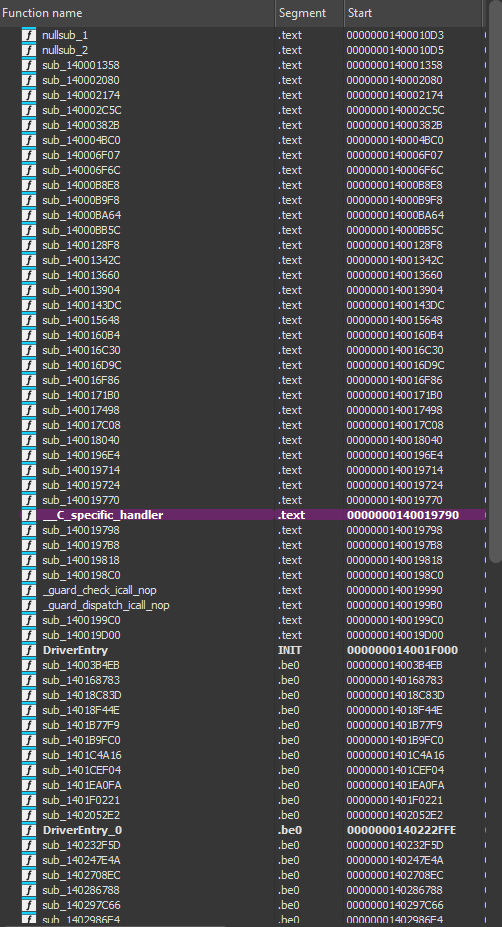 BEDaisy’s section layout: a small .text section alongside a 7.4MB .be0 section. All functions in .be0 appear as nullsubs or data in static analysis of the on-disk binary.
The on-disk .be0 section is not meaningful code. IDA’s autoanalysis produces nothing but nullsub functions and undefined data. This immediately suggests one of two things: the section is packed/encrypted and decrypted at runtime, or it is obfuscated in a way that defeats static disassembly. As it turns out, the answer is closer to the second.
Not VMProtect, Not Themida
A reasonable first guess for a 7.4MB obfuscated section would be VMProtect or Themida, the two most common commercial code protectors used in game security software. However, the section name .be0 does not match the signature of either. VMProtect uses .vmp0/.vmp1 sections, and Themida uses its own distinct markers. There is no .vmp section, no Themida signature strings, and the packing structure does not match known commercial protectors. This is BattlEye’s own proprietary obfuscation scheme.
2. Loading BEDaisy in a VM
Minifilter Registration
BEDaisy registers as a filesystem minifilter driver through the Windows Filter Manager framework. Loading it is not as simple as creating a kernel service and starting it. The driver requires specific registry entries to register with Filter Manager:
1
2
3
4
5
6
HKLM\SYSTEM\CurrentControlSet\Services\BEDaisy\Instances
    DefaultInstance = "BEDaisy Instance"

HKLM\SYSTEM\CurrentControlSet\Services\BEDaisy\Instances\BEDaisy Instance
    Altitude = "321000"
    Flags = 0
The altitude value determines where BEDaisy sits in the filter stack relative to other minifilter drivers. At altitude 321000, it sits below Windows Defender’s WdFilter (328010) but above most other system filters.
After configuring the registry entries, the driver can be loaded. fltmc confirms its registration:
1
2
3
4
5
6
Filter Name                     Num Instances    Altitude    Frame
------------------------------  -------------  ------------  -----
bindflt                                 1       409800         0
WdFilter                                4       328010         0
BEDaisy                                 4       321000         0
applockerfltr                           3       265000         0
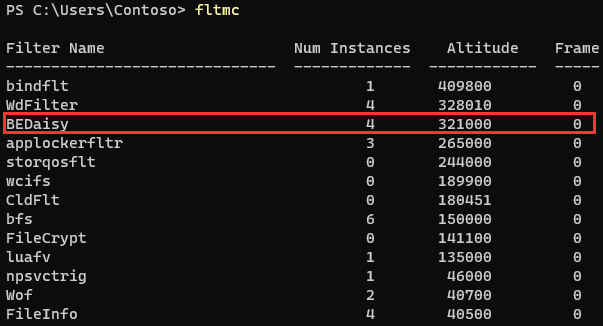 fltmc output showing BEDaisy registered as a minifilter at altitude 321000, with four active instances across mounted volumes.
The Debugger Problem
The first thing I wanted to do was attach a kernel debugger, break at driver load, and step through the unpacking process. This did not work.
I set a breakpoint on nt!MmLoadSystemImage and caught BEDaisy’s load:
1
2
dt nt!_UNICODE_STRING @rcx
 "\??\C:\Program Files (x86)\Common Files\BattlEye\BEDaisy.sys"
MmLoadSystemImage returned successfully (eax=0), and I was able to confirm the image was mapped in memory by finding the MZ header at the base address. But the moment I let execution continue, the driver detected the debugger and unloaded. Setting hardware breakpoints on the .be0 section to catch the unpacker writing decrypted code never fired. The driver checks for the presence of a kernel debugger before doing anything meaningful.
The standard approach would be to patch nt!KdDebuggerEnabled and nt!KdDebuggerNotPresent to hide the debugger. The problem is that patching these values breaks the debugger connection itself, because the kernel debugging subsystem uses them internally. Patching KdDebuggerEnabled to 0 and KdDebuggerNotPresent to 1 causes WinDbg to lose its connection to the target.
Attempting to trace the debugger detection logic was also unproductive. The entry point at .text+0x1f000 immediately jumps into .be0:
1
fffff803`7c16f000    jmp fffff803`7c312ffe
Following the jump reveals heavily obfuscated code with junk instructions, opaque predicates, and multi-level indirect jumps. This is not code you step through instruction by instruction.
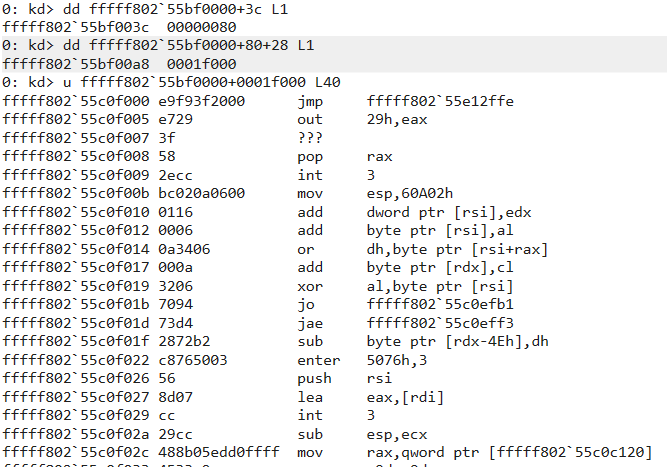 BEDaisy’s DriverEntry immediately jumps into the obfuscated .be0 section. The target address contains junk instructions and control flow obfuscation.
3. Memory Acquisition via Crash Dump
Since attaching a debugger causes the driver to refuse to unpack, I needed a way to capture BEDaisy’s memory while it was running without a debugger present. The solution is straightforward: let the driver load and run normally, then trigger a kernel crash dump that captures all of physical memory.
The Procedure
- Detach WinDbg from the VM completely
- Configure the VM for a Kernel memory dump:
wmic recoveros set DebugInfoType=2 - Reboot (the dump type change requires a reboot to take effect)
- Start BEDaisy via
sc start BEDaisy - Verify it is running with
fltmc - Trigger a BSOD using NotMyFault from Sysinternals (High IRQL fault)
- After reboot, open
C:\Windows\MEMORY.DMPin WinDbg
This works because BEDaisy has no reason to distrust the environment when no debugger is present. It loads, unpacks, registers its callbacks, and runs normally. The crash dump captures the entire kernel address space, including BEDaisy’s memory, in whatever state it was in at the moment of the crash.
One thing that tripped me up: the VM was initially configured for Small memory dumps (DebugInfoType=3), which only creates minidumps that do not contain driver memory. It must be set to Kernel (DebugInfoType=2) or Complete (DebugInfoType=1).
Finding BEDaisy in the Dump
Opening the crash dump in WinDbg, BEDaisy appears in the module list:
1
2
3
lm m BEDaisy
start             end                 module name
fffff803`7c150000 fffff803`7c8d9000   BEDaisy    (deferred)
 BEDaisy present in the kernel crash dump at fffff803`7c150000, confirming the driver was loaded and running when the crash occurred.
I dumped the full image with .writemem:
1
.writemem F:\BEDaisy_unpacked.sys fffff803`7c150000 L788000
 BEDaisy’s section layout: a small .text section alongside a 7.4MB .be0 section. All functions in .be0 appear as nullsubs or data in static analysis of the on-disk binary.
The last page was paged out, so the dump is 4KB short of the full image, but that is padding at the end and does not affect the code.
The Surprise: Still Obfuscated
Loading this dump into IDA, I expected to see decrypted code in the .be0 section. Instead, it looked essentially identical to the on-disk binary. The .be0 section still contained the same opaque data and nullsub functions.
This told me something important: BEDaisy does not use traditional packing. It does not decrypt the .be0 section in place. The code in .be0 runs in its obfuscated form. What I was looking at was not encrypted code waiting to be unpacked, but rather obfuscated code that executes directly with junk instructions, opaque predicates, and control flow flattening as runtime protection.
4. Driver Object and IRP Handlers
Even though the code is obfuscated, the crash dump gives us access to all of the driver’s runtime state. Windows maintains a DRIVER_OBJECT structure for every loaded driver, and that structure contains pointers to all of the driver’s IRP dispatch routines.
DRIVER_OBJECT
The filter manager stores BEDaisy’s driver object reference. Dumping it:
1
2
3
4
5
6
7
8
9
10
dt nt!_DRIVER_OBJECT ffff9d066c631e30
   +0x000 Type             : 0n4
   +0x002 Size             : 0n336
   +0x008 DeviceObject     : 0xffff9d06`6d32f7b0 _DEVICE_OBJECT
   +0x018 DriverStart      : 0xfffff803`7c150000 Void
   +0x020 DriverSize       : 0x789000
   +0x038 DriverName       : _UNICODE_STRING "\FileSystem\BEDaisy"
   +0x058 DriverInit       : 0xfffff803`7c16f000
   +0x068 DriverUnload     : 0xfffff803`4ffbccf0  FLTMGR!FltpMiniFilterDriverUnload
   +0x070 MajorFunction    : [28] 0xfffff803`7c152174
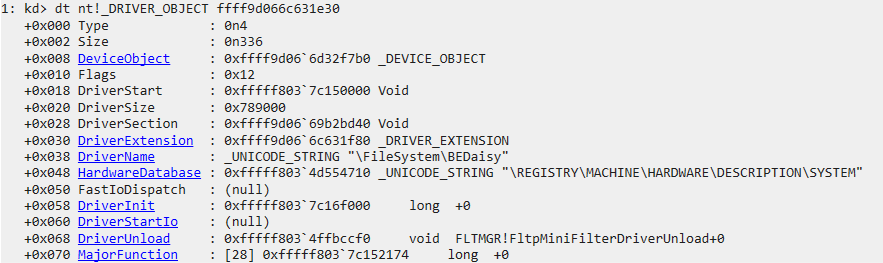 BEDaisy’s DRIVER_OBJECT showing DriverStart at the image base, DriverName as \FileSystem\BEDaisy, and DriverUnload pointing to Filter Manager’s unload routine.
Notable details: DriverName is \FileSystem\BEDaisy, confirming it registers as a filesystem driver (consistent with its minifilter role). The DriverUnload points to FLTMGR!FltpMiniFilterDriverUnload, which is normal for minifilter drivers since Filter Manager handles unload coordination.
Device Object
BEDaisy creates a device object named BattlEye:
1
2
3
4
!devobj ffff9d06`6d32f7b0
Device object (ffff9d066d32f7b0) is for:
 BattlEye \FileSystem\BEDaisy DriverObject ffff9d066c631e30
Current Irp 00000000 RefCount 0 Type 00000022 Flags 00000040
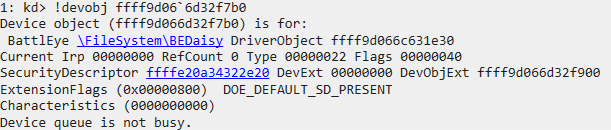 The BattlEye device object created by BEDaisy. This is the endpoint that BEService.exe opens to communicate with the driver via IOCTLs.
This is the device that BEService.exe opens with CreateFile to establish communication with the driver.
MajorFunction Dispatch Table
The MajorFunction array in the DRIVER_OBJECT contains pointers to the driver’s IRP handlers. Using dqs to dump them with symbol resolution:
1
2
3
4
5
6
7
8
9
10
dqs ffff9d066c631e30+70 L1c
ffff9d06`6c631ea0  fffff803`7c152174 BEDaisy+0x2174    ; IRP_MJ_CREATE
ffff9d06`6c631ea8  fffff803`4ca31560 nt!IopInvalidDeviceRequest
ffff9d06`6c631eb0  fffff803`7c1520d0 BEDaisy+0x20d0    ; IRP_MJ_CLOSE
ffff9d06`6c631eb8  fffff803`7c1537e0 BEDaisy+0x37e0    ; IRP_MJ_READ
ffff9d06`6c631ec0  fffff803`7c156efc BEDaisy+0x6efc    ; IRP_MJ_WRITE
ffff9d06`6c631ec8  fffff803`4ca31560 nt!IopInvalidDeviceRequest
...
ffff9d06`6c631f10  fffff803`7c168040 BEDaisy+0x18040   ; IRP_MJ_DEVICE_CONTROL
...
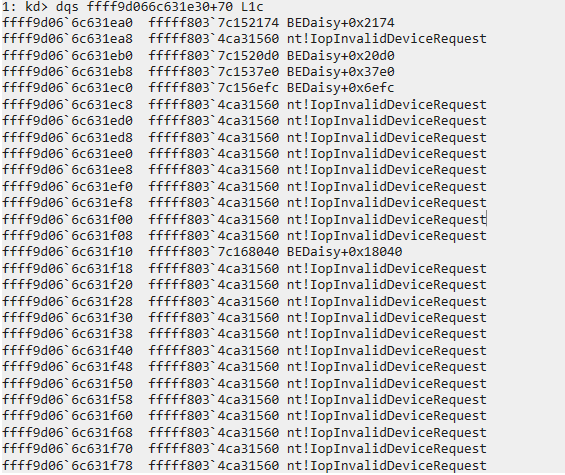 BEDaisy’s MajorFunction dispatch table. Five custom handlers are registered; all others fall through to nt!IopInvalidDeviceRequest.
BEDaisy registers five custom IRP handlers:
| Index | IRP Type | Address |
|---|---|---|
| 0 | IRP_MJ_CREATE | BEDaisy+0x2174 |
| 2 | IRP_MJ_CLOSE | BEDaisy+0x20d0 |
| 3 | IRP_MJ_READ | BEDaisy+0x37e0 |
| 4 | IRP_MJ_WRITE | BEDaisy+0x6efc |
| 14 | IRP_MJ_DEVICE_CONTROL | BEDaisy+0x18040 |
The IRP_MJ_DEVICE_CONTROL handler at index 14 is the most significant. This is where BEService.exe sends commands to the driver and receives detection results. The CREATE/CLOSE handlers manage device handle lifecycle, and READ/WRITE may be used for data transfer between the service and driver.
Obfuscated Trampolines
Disassembling these handlers reveals the obfuscation pattern. Every custom IRP handler in the .text section is a thin trampoline that immediately jumps into obfuscated code in .be0.
IRP_MJ_CREATE is the simplest case, a single jump instruction:
1
2
BEDaisy+0x2174:
fffff803`7c152174  jmp BEDaisy+0x2df27e
IRP_MJ_DEVICE_CONTROL has a heavier obfuscated preamble before the jump:
1
2
3
4
5
6
7
8
9
10
BEDaisy+0x18040:
fffff803`7c168040 9c              pushfq
fffff803`7c168041 56              push    rsi
fffff803`7c168042 48c7442408...   mov     qword ptr [rsp+8], 73531E35h
fffff803`7c16804b 48beaca12c...   mov     rsi, 87802099C12CA1ACh
fffff803`7c168055 0fce            bswap   esi
fffff803`7c168057 9c              pushfq
fffff803`7c168058 4080c688        add     sil, 88h
...
fffff803`7c168073 e9d40b3100      jmp     BEDaisy+0x328c4c
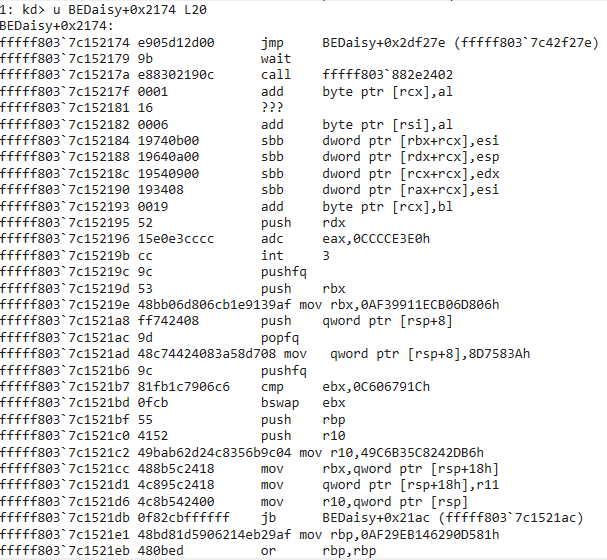 IRP_MJ_CREATE: a single jmp instruction into .be0. Everything after it is junk data.
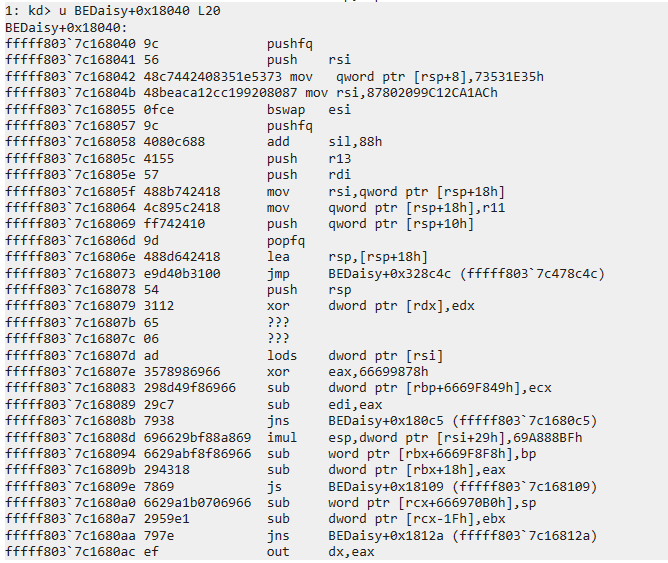 IRP_MJ_DEVICE_CONTROL: junk preamble with meaningless register operations before the real jump into .be0. The pushfq/bswap/add instructions accomplish nothing.
The pattern is consistent across all handlers. The .text section is a dispatch table of trampolines. The real driver logic lives entirely in the obfuscated .be0 section.
5. Minifilter Callbacks
The Filter Manager maintains its own internal structures tracking registered filters and their callbacks. The !fltkd.filter extension dumps this information:
1
2
3
4
5
6
7
FLT_FILTER: ffff9d066c49dc20 "BEDaisy" "321000"
   Frame                    : ffff9d0669041010 "Frame 0"
   Flags                    : [00000002] FilteringInitiated
   DriverObject             : ffff9d066c631e30
   FilterUnload             : fffff8037c152850  BEDaisy+0x2850
   OldDriverUnload          : fffff8037c15219c  BEDaisy+0x219c
   Operations               : ffff9d066c49ded8
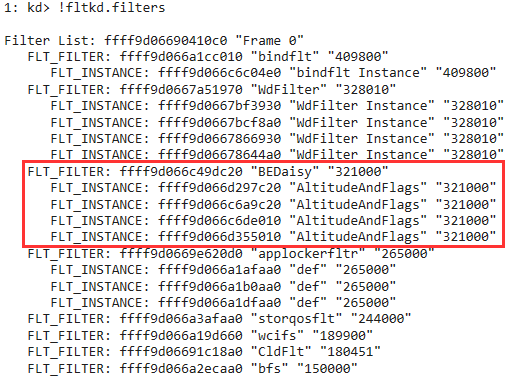 !fltkd.filter output showing BEDaisy’s registered minifilter callbacks and the driver object reference.
The FilterUnload callback is one of the only clean, unobfuscated functions in the entire driver:
1
2
3
BEDaisy+0x2850:
fffff803`7c152850  xor eax, eax
fffff803`7c152852  ret
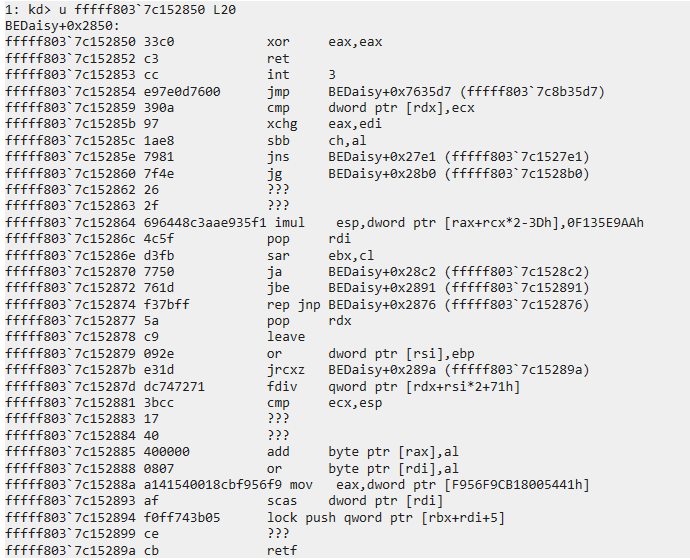 BEDaisy’s FilterUnload callback: two instructions. Returns STATUS_SUCCESS (0) to allow the filter to unload. This is one of the only unobfuscated functions in the driver.
It returns STATUS_SUCCESS (0), allowing the filter to unload. Compare this to OldDriverUnload at BEDaisy+0x219c, which is heavily obfuscated with the same junk instruction pattern seen in the IRP handlers.
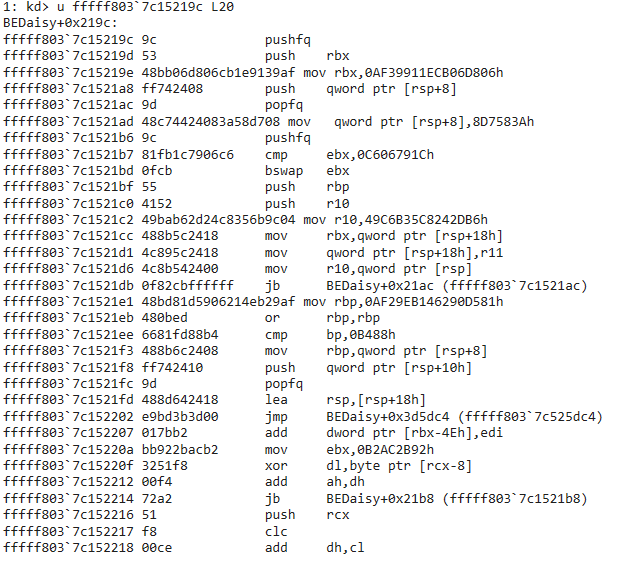 OldDriverUnload: obfuscated code with junk constants, meaningless bswap/cmp operations, and a final jmp into .be0. Same pattern as the IRP handlers.
6. Kernel Callback Registration
The crash dump allows enumeration of all kernel callbacks registered on the system. BEDaisy registers the full set of monitoring callbacks that I described in the first post.
Process Creation Callback
The PspCreateProcessNotifyRoutine array holds pointers to callback registration blocks. Each entry is a tagged pointer; clearing the low nibble gives the actual address, and offset +8 contains the callback function pointer:
1
2
3
4
5
6
7
8
9
dq fffff803`4d50c610 L40
...
ffff9d06`6c81be6f    ; Last entry - most recently registered

? ffff9d06`6c81be6f & ffffffff`fffffff0   ; Clear tag
= ffff9d06`6c81be60

dqs ffff9d06`6c81be60+8 L1
ffff9d06`6c81be68  fffff803`7c151b6c BEDaisy+0x1b6c
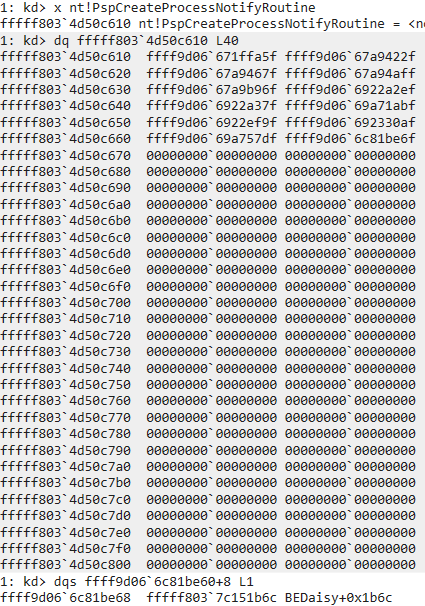 BEDaisy’s process creation callback at BEDaisy+0x1b6c, extracted from the PspCreateProcessNotifyRoutine array.
Thread Creation Callback
Same technique against PspCreateThreadNotifyRoutine:
1
2
dqs ffff9d06`6c819b20+8 L1
ffff9d06`6c819b28  fffff803`7c151ec0 BEDaisy+0x1ec0
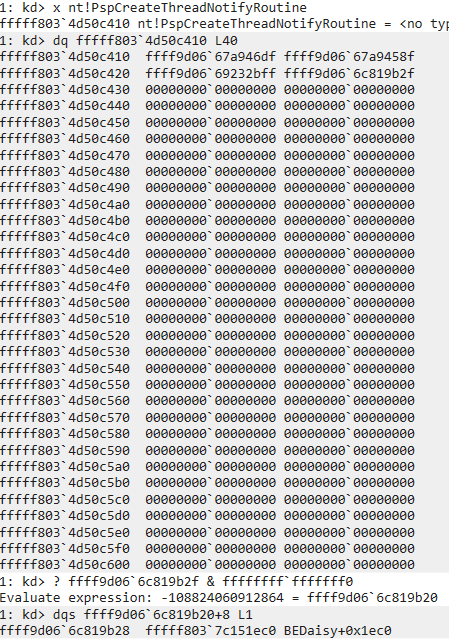 BEDaisy’s thread creation callback at BEDaisy+0x1ec0.
Image Load Callback
And PspLoadImageNotifyRoutine:
1
2
dqs ffff9d06`6c819a90+8 L1
ffff9d06`6c819a98  fffff803`7c152c80 BEDaisy+0x2c80
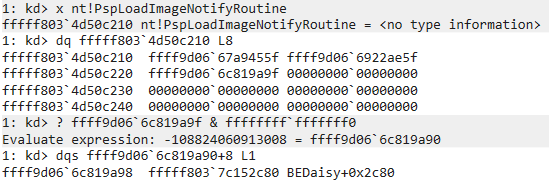 BEDaisy’s image load callback at BEDaisy+0x2c80.
All three callbacks follow the same pattern: the function in .text is a one-instruction trampoline (jmp into .be0), and the real logic is obfuscated.
1
2
BEDaisy+0x1b6c:
fffff803`7c151b6c  jmp BEDaisy+0x7615be
This confirms what the first post described theoretically: BattlEye registers PsSetCreateProcessNotifyRoutineEx, PsSetCreateThreadNotifyRoutine, and PsSetLoadImageNotifyRoutine to monitor all process, thread, and image activity system-wide.
7. Runtime API Resolution Table
This was the most revealing finding. BEDaisy does not import most of its kernel API dependencies through the PE import table. Instead, it resolves them at runtime and stores the function pointers in a table in its .data section. This is a common anti-analysis technique: it hides the driver’s capabilities from static import table analysis.
Dumping the table from the crash dump with dqs (which resolves addresses to symbol names) reveals the complete set of kernel APIs that BEDaisy uses:
1
dqs FFFFF8037C16C280 L80
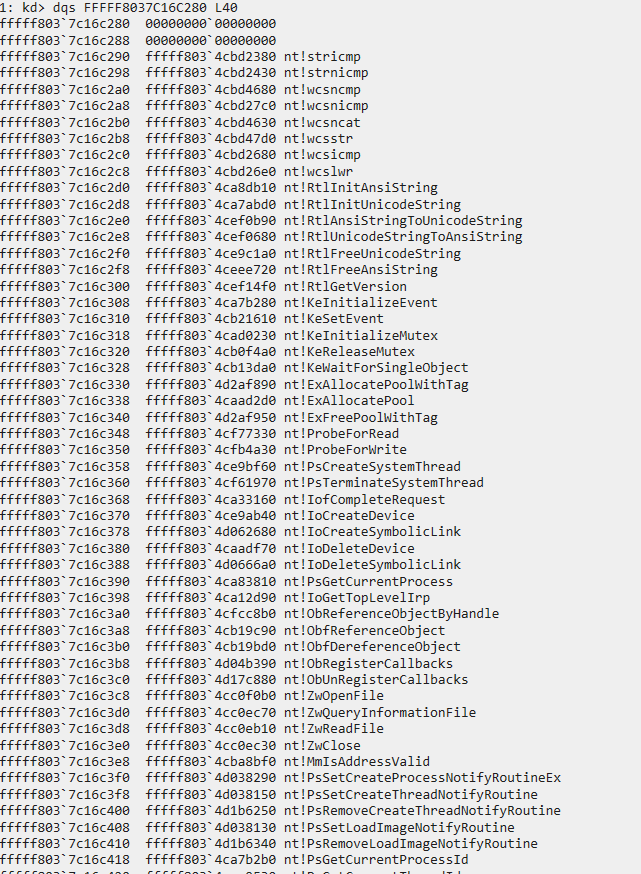 First block of BEDaisy’s runtime-resolved API table: string operations, synchronization primitives, memory allocation, process/thread lookup, handle management, and ObRegisterCallbacks.
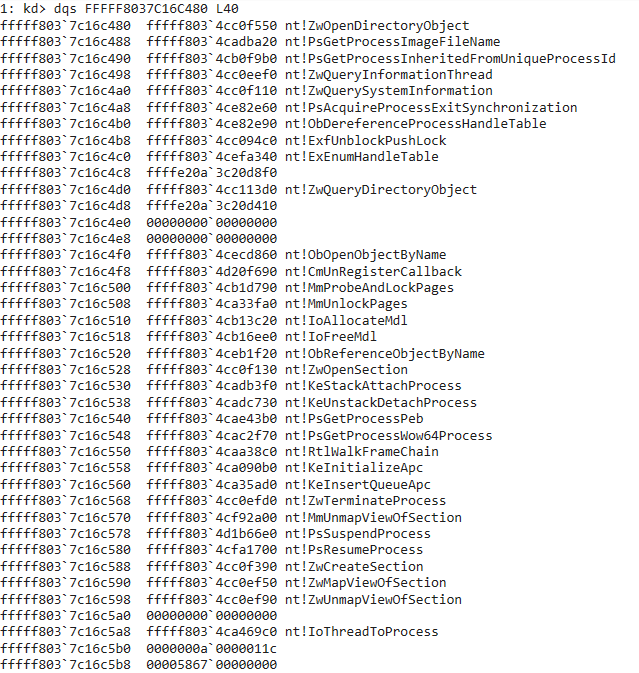 Second block: handle table enumeration, memory inspection, process control, section manipulation, APC injection, and call stack analysis APIs.
The full table, organized by purpose:
String Operations
nt!stricmp,nt!strnicmp- Case-insensitive string comparison (process name matching)nt!wcsncmp,nt!wcsnicmp,nt!wcsncat,nt!wcsstr,nt!wcsicmp,nt!wcslwr- Wide string operationsnt!RtlInitAnsiString,nt!RtlInitUnicodeString- String initializationnt!RtlAnsiStringToUnicodeString,nt!RtlUnicodeStringToAnsiString- String conversionnt!RtlFreeUnicodeString,nt!RtlFreeAnsiString- String cleanup
Process and Thread Monitoring
nt!PsSetCreateProcessNotifyRoutineEx- Process creation/termination callbacknt!PsSetCreateThreadNotifyRoutine,nt!PsRemoveCreateThreadNotifyRoutine- Thread monitoringnt!PsSetLoadImageNotifyRoutine,nt!PsRemoveLoadImageNotifyRoutine- Image load monitoringnt!PsGetCurrentProcessId,nt!PsGetCurrentThreadId- Current context identificationnt!PsGetProcessId,nt!PsGetThreadId,nt!PsGetThreadProcessId- ID lookupsnt!PsGetProcessImageFileName- Process name retrievalnt!PsGetProcessInheritedFromUniqueProcessId- Parent process identificationnt!PsLookupProcessByProcessId,nt!PsLookupThreadByThreadId- Object lookupsnt!IoThreadToProcess- Thread to process mapping
Handle Protection
nt!ObRegisterCallbacks,nt!ObUnRegisterCallbacks- Handle access filteringnt!ObReferenceObjectByHandle,nt!ObfReferenceObject,nt!ObfDereferenceObject- Reference managementnt!ObOpenObjectByPointer,nt!ObOpenObjectByName,nt!ObReferenceObjectByName- Object accessnt!ObQueryNameString- Object name resolution
Handle Table Enumeration
nt!ExEnumHandleTable- Walks another process’s handle tablent!PsAcquireProcessExitSynchronization- Prevents target process from exiting during scannt!ObDereferenceProcessHandleTable- Direct handle table access
Memory Inspection
nt!KeStackAttachProcess,nt!KeUnstackDetachProcess- Cross-process memory accessnt!MmProbeAndLockPages,nt!MmUnlockPages- MDL-based memory operationsnt!IoAllocateMdl,nt!IoFreeMdl- MDL managementnt!MmIsAddressValid- Address validationnt!ProbeForRead,nt!ProbeForWrite- User buffer probingnt!PsGetProcessPeb,nt!PsGetProcessWow64Process- PEB access for module enumeration
Process Control and Enforcement
nt!ZwTerminateProcess- Process termination (killing cheat processes)nt!PsSuspendProcess,nt!PsResumeProcess- Process freezing during scansnt!KeInitializeApc,nt!KeInsertQueueApc- APC injection into target threadsnt!MmUnmapViewOfSection- Unmapping injected DLLs
Section and Module Verification
nt!ZwCreateSection,nt!ZwMapViewOfSection,nt!ZwUnmapViewOfSection- Section mapping for on-disk vs in-memory comparisonnt!ZwOpenSection- Section object access
File I/O
nt!ZwOpenFile,nt!ZwReadFile,nt!ZwQueryInformationFile,nt!ZwClose- File operations for integrity verification
System Information
nt!ZwQuerySystemInformation- System-wide queriesnt!ZwQueryInformationThread- Thread information (start address queries)nt!RtlGetVersion- OS version detection
Object Directory Enumeration
nt!ZwOpenDirectoryObject,nt!ZwQueryDirectoryObject- Kernel object enumeration (looking for suspicious drivers/devices)
Registry Monitoring
nt!CmUnRegisterCallback- Registry callback management
Call Stack Analysis
nt!RtlWalkFrameChain- Stack walking to detect hooks or injected callers
Synchronization
nt!KeInitializeEvent,nt!KeSetEvent- Event signalingnt!KeInitializeMutex,nt!KeReleaseMutex,nt!KeWaitForSingleObject- Mutex operationsnt!ExfUnblockPushLock- Push lock management
Memory Allocation
nt!ExAllocatePoolWithTag,nt!ExAllocatePool,nt!ExFreePoolWithTag- Pool allocation
Device and Driver Management
nt!IoCreateDevice,nt!IoDeleteDevice- Device object managementnt!IoCreateSymbolicLink,nt!IoDeleteSymbolicLink- Symbolic link managementnt!IofCompleteRequest- IRP completionnt!IoGetTopLevelIrp- IRP inspectionnt!IoQueryFileDosDeviceName- File path resolutionnt!ZwDeviceIoControlFile- IOCTL dispatchnt!PsCreateSystemThread,nt!PsTerminateSystemThread- System thread managementnt!RtlRandomEx- Random number generation
This table is, in my opinion, the single most valuable output of the analysis. Without deobfuscating a single function, it reveals BEDaisy’s complete capability set. Every technique I described in the first post (handle protection via ObRegisterCallbacks, process/thread monitoring, memory scanning via KeStackAttachProcess, APC-based stack walking, handle table enumeration) is confirmed by the presence of the corresponding API in this table.
8. Decompiling Obfuscated Callbacks
The obfuscation in .be0 makes manual disassembly impractical, but modern decompilers can often see through it. I loaded the memory dump into IDA as a raw binary (not as a PE, to avoid section mapping issues) and tried the Hex-Rays decompiler on the callback functions. The results were surprisingly usable.
Process Creation Callback
The process creation callback at BEDaisy+0x1b6c jumps to sub_FFFFF8037C8B15BE in .be0. IDA’s decompiler produced readable pseudocode after cutting through the obfuscation. After renaming variables based on the callback signature (PcreateProcessNotifyRoutineEx) and resolving the indirect function calls against the API table from the crash dump, the logic becomes clear. I will walk through the decompiled output in order, with my annotations.
The function’s primary branch is on CreateInfo. When CreateInfo is non-null, a process is being created. When it is null, a process is exiting. This is the standard behavior of a PcreateProcessNotifyRoutineEx callback.
For process creation, the first thing the callback does is call fn_PsGetCurrentProcessId to identify the calling context. It then checks whether a game is already being tracked (g_GamePID != 0) and whether parent validation is enabled (g_ValidateParent). If both are true, it compares the creating thread’s unique process identifier (at CreateInfo+24, which corresponds to the CreatingThreadId.UniqueProcess field of PS_CREATE_NOTIFY_INFO) against a stored token. If the token does not match, the callback calls fn_ValidateChildProcess to investigate the child process further.
The next block handles first-time game detection. When g_DriverMode is -1 and no game is currently tracked, the callback checks whether the new process was created by the expected parent, which is BEService. If CreateInfo+24 matches g_ExpectedParentToken, the callback stores the BEService PID and jumps to the initialization block. If it does not match, the callback returns immediately. This is how BEDaisy identifies the game process: it knows BEService’s identity, and the first child process that BEService creates is assumed to be the game.
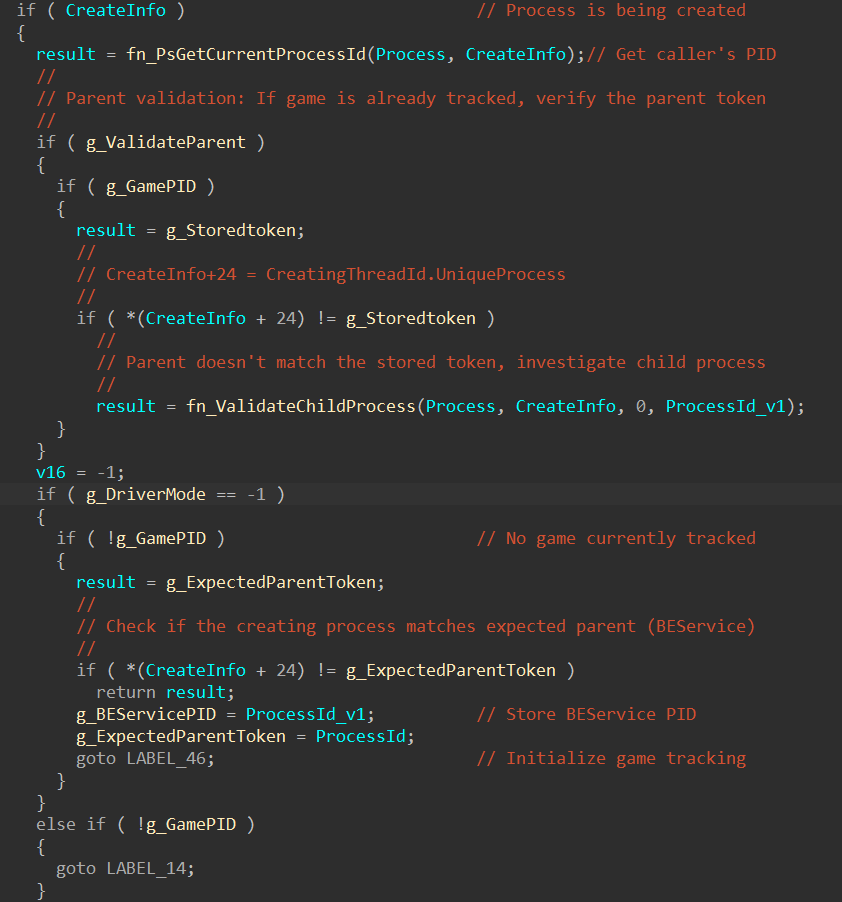 Process creation entry: parent token validation and first-time game detection via BEService’s PID.
Once the game is identified, the callback retrieves the process image name via fn_PsGetProcessImageFileName. On the very first detection (g_DriverMode == -1), it copies the image name into a global buffer (g_ProcessImageName) using a manual strlen loop followed by memmove, capping the name at 32 characters. On subsequent process creation events, it uses fn_stricmp to compare the new process’s name against the stored game name. If the names do not match, the callback returns early. This is how BEDaisy handles game relaunches: it remembers the game’s executable name and watches for it to appear again.
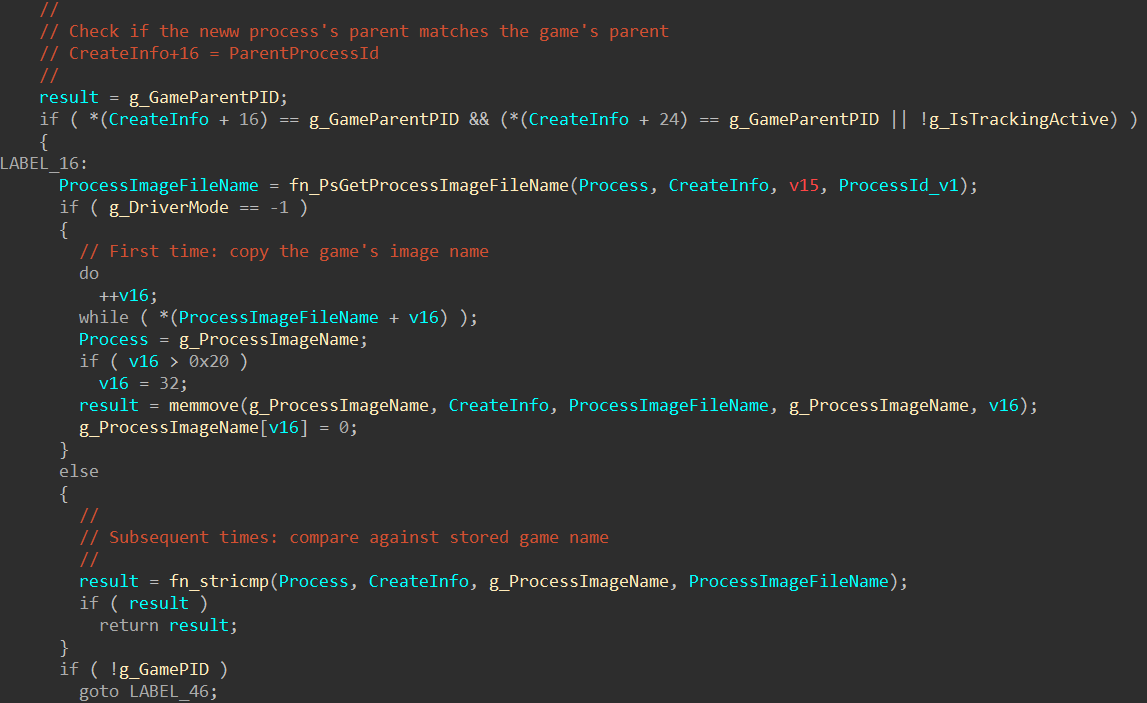 Process name matching: first launch copies the image name, subsequent launches compare against it with stricmp.
The cleanup path (LABEL_25) executes when the game process exits. It acquires a mutex via fn_KeWaitForSingleObject, then walks the first of two singly-linked lists. g_ProtectedProcessList contains entries with a status field at offset 1048, an object reference at offset 1056, and a next pointer at offset 1064. Entries with status equal to 1 (active) are kept. Inactive entries have their events signaled via fn_KeSetEvent and their memory freed via fn_ExFreePoolWithTag. The node itself is then unlinked and freed.
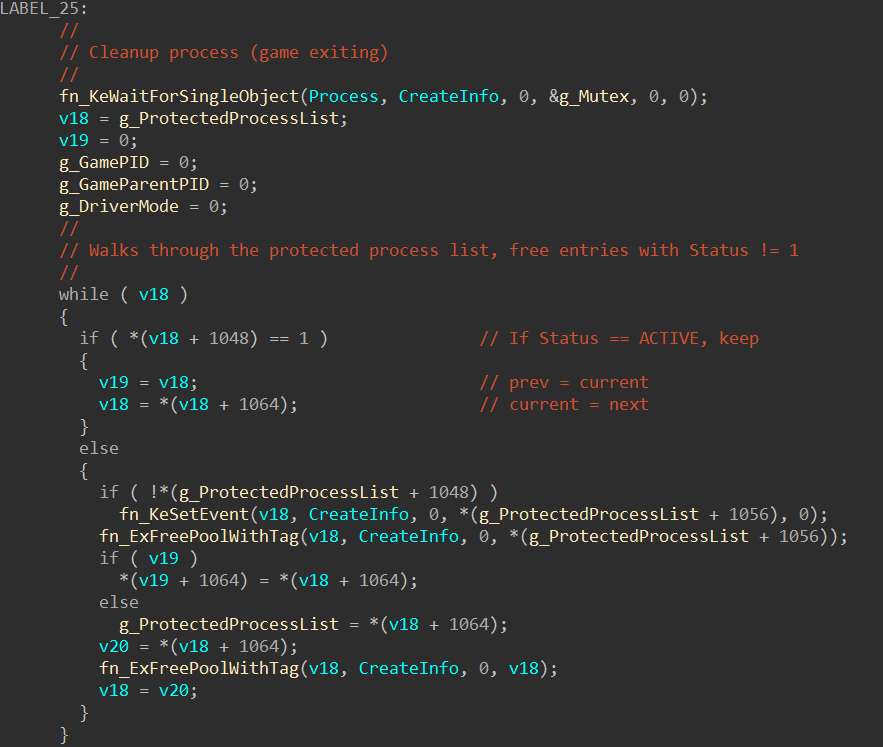 Game exit cleanup: mutex acquisition and walking the protected process linked list, freeing inactive entries.
The second linked list (g_MonitoredThreadList) follows a similar pattern with an active flag at offset 536 and a next pointer at offset 544. This list also maintains a tail pointer (g_MonitoredThreadListTail) that is updated when the tail entry is removed. After both lists are cleaned, the mutex is released with fn_KeReleaseMutex, and all tracking state is zeroed.
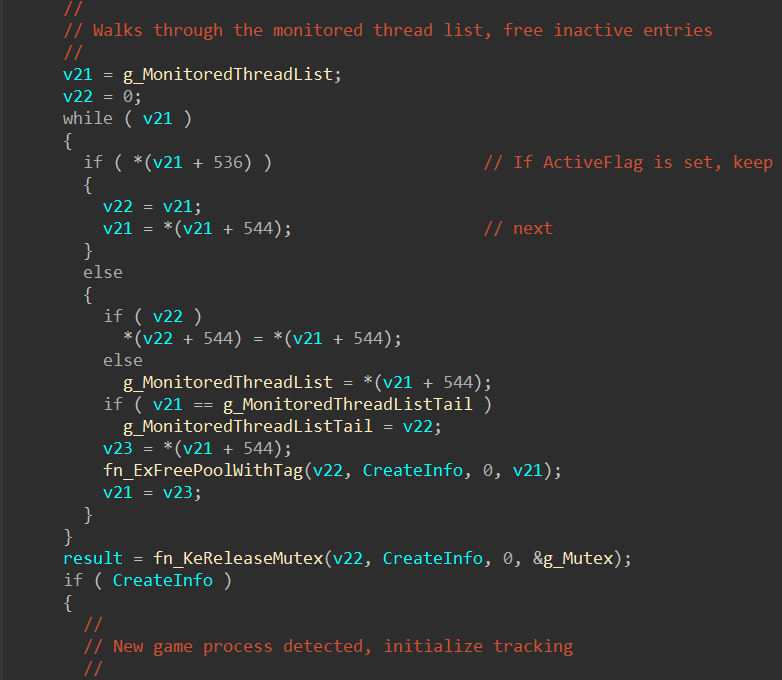 Monitored thread list cleanup and mutex release. The tail pointer update at g_MonitoredThreadListTail is visible.
The initialization block (LABEL_46) runs when a new game process is first detected. It sets g_IsTrackingActive to 1, stores the new process ID and parent process ID, copies the 128-bit creator token from CreateInfo+24 into g_StoredToken, and resets roughly a dozen state variables to zero. These variables correspond to the various scanning and monitoring subsystems that BEDaisy runs while the game is active. Setting byte_FFFFF8037C16C175 to 1 at the end signals that initialization is complete. Below that, LABEL_14 is the fallback path for non-first-launch mode: it checks whether the creating process matches BEService before proceeding to name matching.
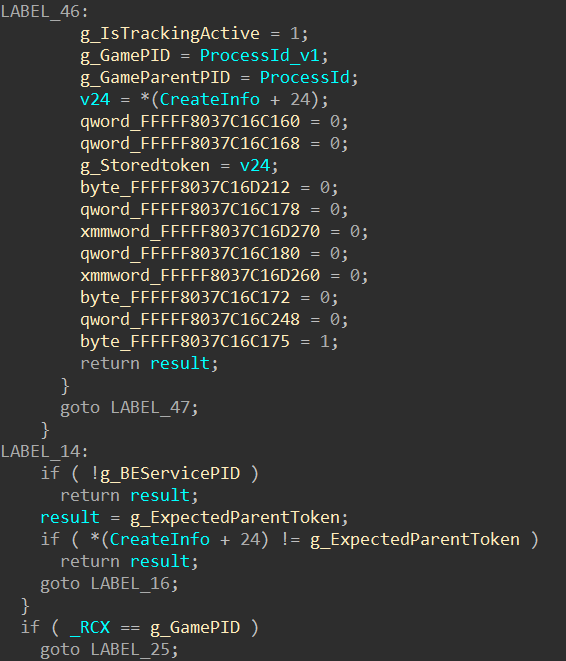 LABEL_46 initialization block resetting all scan state, followed by the LABEL_14 BEService validation fallback.
The process exit path (when CreateInfo is null) is the simplest part. If the exiting process is the game (_RCX == g_GamePID), it jumps to the cleanup block described above. Otherwise, it checks whether the exiting process was BEService and clears g_BEServicePID if so. It also walks a small array of three tracked child PIDs and clears any matching entry.
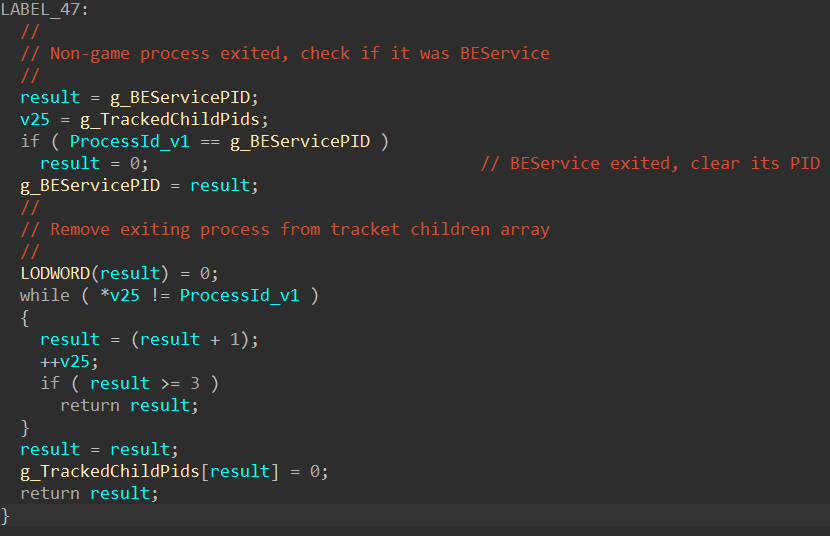 Process exit handling: BEService PID tracking and the three-entry child PID array cleanup.
Thread Creation Callback
The thread callback at BEDaisy+0x1ec0 jumps to FFFFF8037C8B1C02 in .be0. IDA did not recognize it as a function automatically, so I had to place the cursor on the target address and press P to create a function before F5 would produce output. After decompilation and variable renaming, the logic is a clean implementation of the remote thread injection detection I described in the first post.
The function begins with a stack cookie check (v12 ^ g_StackCookie), which the process callback did not have. This is likely because the thread callback uses local stack buffers for the thread handle and start address, while the process callback operates mostly on globals.
The entry condition filters aggressively. The callback only proceeds if three conditions are met simultaneously: the ProcessId parameter matches g_GamePID (the thread is being created in the game process), g_GamePID is non-zero (a game is actually being tracked), and Create is true (this is a thread creation, not a termination). If any of these fail, the callback returns immediately without doing any work.
When all three conditions pass, the callback checks whether the thread was created by the game itself or by an external process. It reads the current ETHREAD pointer from the GS segment (__readgsqword(0x188)) and passes it to fn_PsGetThreadProcessId to get the creating thread’s owning process ID. If that PID matches g_GamePID, the game created its own thread and there is nothing suspicious. If it does not match, an external process injected a thread into the game, and BEDaisy begins its inspection.
The inspection starts by looking up the thread object via fn_PsLookupThreadByThreadId, then opening a handle to it with fn_ObOpenObjectByPointer requesting THREAD_QUERY_INFORMATION access (0x200). The object type passed to ObOpenObjectByPointer is dereferenced from fn_PsThreadType, which is the kernel’s PsThreadType global. With the handle open, BEDaisy calls fn_ZwQueryInformationThread with information class 9 (ThreadQuerySetWin32StartAddress) to retrieve the thread’s start address into ThreadStartAddress.
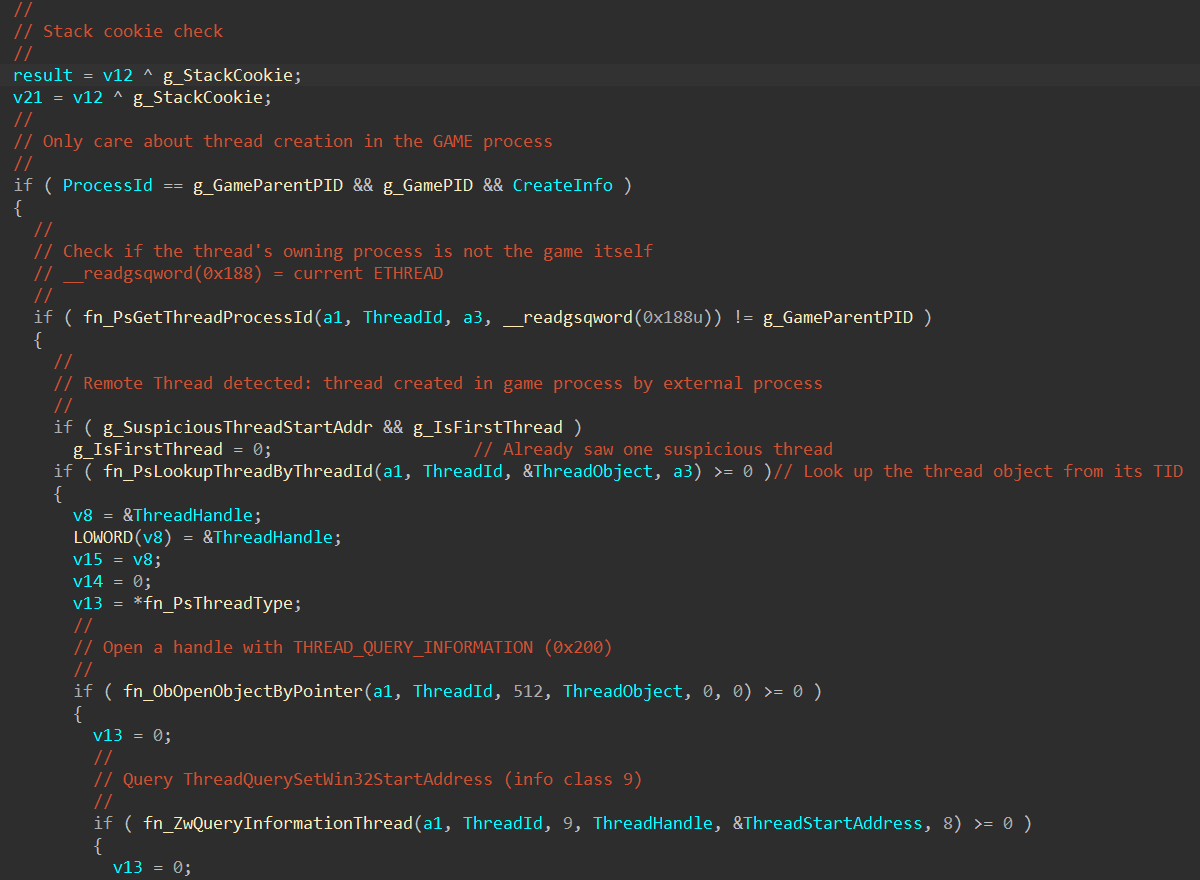 Thread creation callback entry: filtering for the game process, remote thread detection via PsGetThreadProcessId, thread object lookup, and start address query.
With the start address in hand, BEDaisy acquires the mutex and walks g_MonitoredThreadList. Each entry in this list contains a module base address at offset 0 and a module size at offset 8, with the next pointer at offset 544. The loop checks whether ThreadStartAddress falls within the range [base, base + size) for each entry. If it finds a match, the thread’s start address is inside a known legitimate module and the break exits the loop. If the loop exhausts the entire list without finding a match (!v11), the start address does not belong to any known module, and BEDaisy stores it in g_SuspiciousThreadStartAddr. The g_IsFirstThread flag controls whether this is the first suspicious thread seen: on the first detection it stores the address but does not report yet, giving the system a chance to see if the thread is benign.
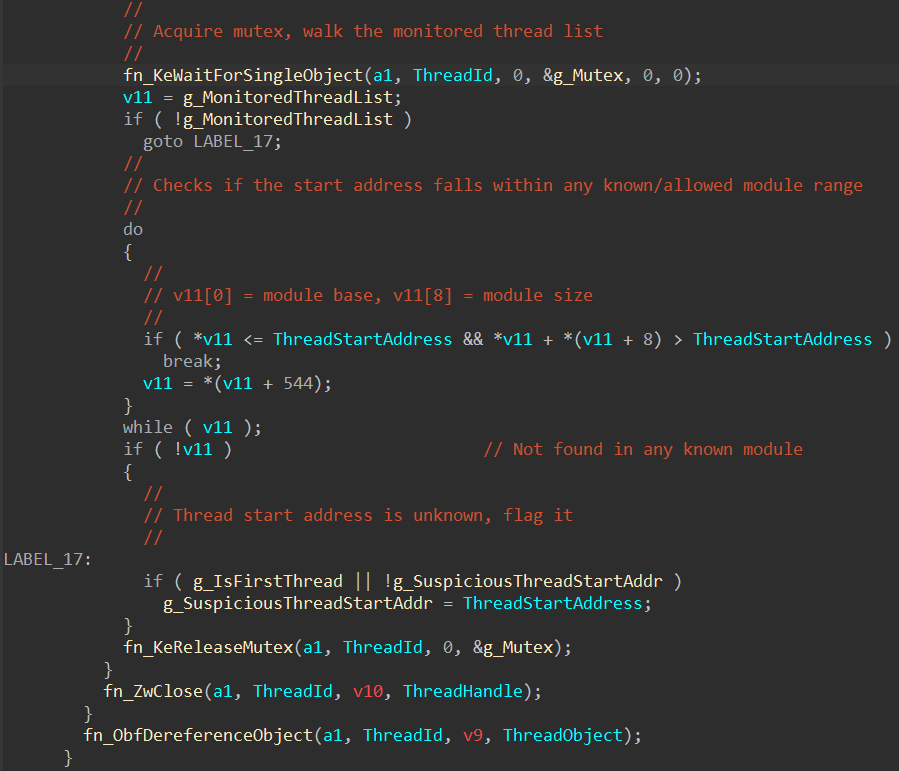 Module allowlist walk: checking the thread start address against known base/size pairs, flagging unknown addresses.
After releasing the mutex and cleaning up the thread handle (fn_ZwClose) and object reference (fn_ObfDereferenceObject), the callback checks whether a violation should be reported. If g_SuspiciousThreadStartAddr is set and g_IsFirstThread is false (meaning this is not the first suspicious thread), it builds a small report structure on the stack: v19 = 3 is the violation type (remote thread injection) and v20 = g_SuspiciousThreadStartAddr is the offending address. This is passed to sub_FFFFF8037C397E4A, the violation reporting function that sends the detection to BEService through the IOCTL channel. That function could not be decompiled due to stack frame obfuscation caused by the heavy junk instruction preamble, but its role is clear from context.
The callback ends with a call to sub_FFFFF8037C309FC0, which is likely the stack cookie validation epilogue.
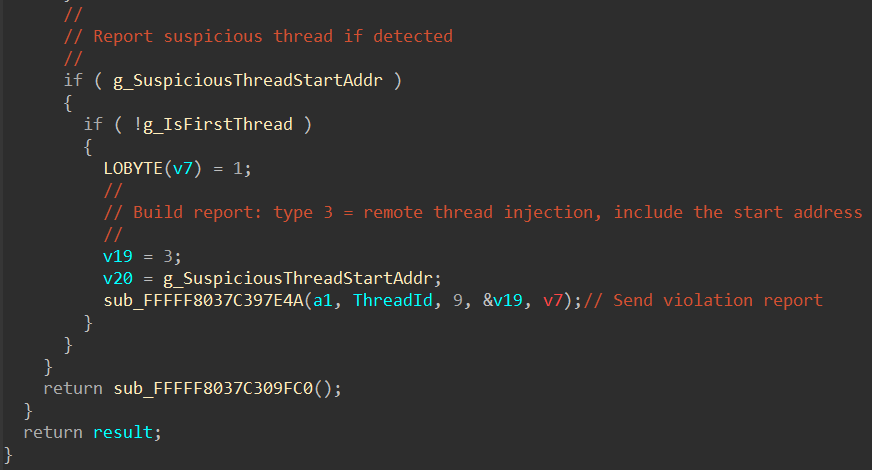 Violation reporting: building a type 3 report with the suspicious start address and sending it to BEService.
9. The Obfuscation
The code obfuscation in .be0 deserves its own discussion, because understanding what BattlEye is doing and why helps frame what is and is not recoverable through analysis.
Junk Instructions
The most visible layer is junk instruction insertion. Every function is padded with instructions that have no effect on the program state:
mov     rbx, 0AF39911ECB06D806h     ; Large constant loaded into rbx
bswap   ebx                          ; Byte-swap (result unused)
cmp     ebx, 0C606791Ch              ; Comparison (result unused)
mov     r10, 49C6B35C8242DB6h        ; Another dead constant
These instructions execute and consume CPU cycles, but their results are never used by the actual program logic. IDA’s decompiler eliminates most of these automatically.
Opaque Predicates
Conditional branches that always take the same path but are difficult to evaluate statically:
mov     rsi, 87802099C12CA1ACh
bswap   esi
add     sil, 88h
; ... conditional branch based on flags from the add
The condition is deterministic (the constant is known at compile time), but a static disassembler cannot easily evaluate it without symbolic execution. This breaks linear disassembly and makes control flow graph reconstruction difficult.
Multi-Level Indirect Jumps
Rather than a simple jmp target, the obfuscated code uses push/popfq sequences to manipulate the stack and indirect jumps through computed addresses:
pushfq
mov     qword ptr [rsp+8], 1D2D9B80h
popfq
...
jmp     far_away_address
The flags register is saved and restored around junk operations, ensuring the real program logic is preserved while the control flow graph is destroyed.
What the Decompiler Handles
Despite all of this, IDA’s Hex-Rays decompiler produced usable output for every function I tried. The decompiler’s data flow analysis can determine that a register loaded with a constant and never used afterward is dead code, and it eliminates it. The resulting pseudocode is not pristine, but it is readable enough to understand the program logic, as demonstrated in the callback analysis above.
This suggests that BEDaisy’s obfuscation is primarily targeted at making manual disassembly and debugging impractical, rather than defeating automated decompilation. The debugger detection (which prevents runtime analysis entirely) is arguably a more effective protection than the code obfuscation itself.
10. Conclusion
This analysis recovered significantly more information about BEDaisy’s internals than I initially expected, despite never executing the driver under a debugger. The combination of crash dump analysis and modern decompilation tools made it possible to:
- Extract the complete runtime API resolution table, revealing every kernel API BEDaisy uses
- Enumerate all registered kernel callbacks (process, thread, image load)
- Dump the IRP dispatch table and identify all custom handlers
- Decompile the process creation and thread creation callbacks to readable pseudocode
- Understand BEDaisy’s game process lifecycle management and remote thread injection detection
The obfuscation is real and significant, it will stop casual inspection and make automated tooling development difficult, but it does not prevent a determined analyst with access to the right tools from understanding the driver’s behavior. The debugger detection is arguably more effective as a protection mechanism, because it forces the analyst into offline analysis workflows that are slower and more limited.
What remains unexplored is the bulk of the .be0 section. The IRP_MJ_DEVICE_CONTROL handler (the IOCTL interface between BEService and the driver), the ObRegisterCallbacks implementation, the memory scanning logic, and the handle table enumeration code are all present in the dump and theoretically decompilable, but each would require significant time investment to rename variables, resolve function pointers, and reconstruct the program logic. That is work for another time, or another post.
The runtime API table alone tells us that BEDaisy implements every major technique covered in the first post: handle protection, process/thread/image monitoring, cross-process memory access, handle table scanning, APC-based thread injection for stack walking, section mapping for integrity verification, and process suspension for scan safety. BattlEye’s kernel driver is not doing anything exotic or unknown. It is executing well-understood anti-cheat techniques behind a layer of obfuscation and debugger detection that makes casual reverse engineering impractical and raises the cost of developing bypasses.
References
secret.club. “Reversing BattlEye’s anti-cheat kernel driver.” 2019. https://secret.club/2019/02/10/battleye-anticheat.html
back.engineering. “Reversing BEDaisy.sys.” 2020. https://back.engineering/blog/2020/08/22/
Aki2k. “BEDaisy Reverse Engineering.” GitHub. https://github.com/Aki2k/BEDaisy
Vella, R. et al. “If It Looks Like a Rootkit and Deceives Like a Rootkit: A Critical Analysis of Kernel-Level Anti-Cheat Systems.” ARES 2024. https://arxiv.org/pdf/2408.00500
Microsoft. “ObRegisterCallbacks function.” https://learn.microsoft.com/en-us/windows-hardware/drivers/ddi/wdm/nf-wdm-obregistercallbacks
Microsoft. “FltRegisterFilter function.” https://learn.microsoft.com/en-us/windows-hardware/drivers/ddi/fltkernel/nf-fltkernel-fltregisterfilter
Microsoft. “Filter Manager Concepts.” https://learn.microsoft.com/en-us/windows-hardware/drivers/ifs/filter-manager-concepts
Sysinternals. “NotMyFault.” https://learn.microsoft.com/en-us/sysinternals/downloads/notmyfault